Gymax Google Slides Template
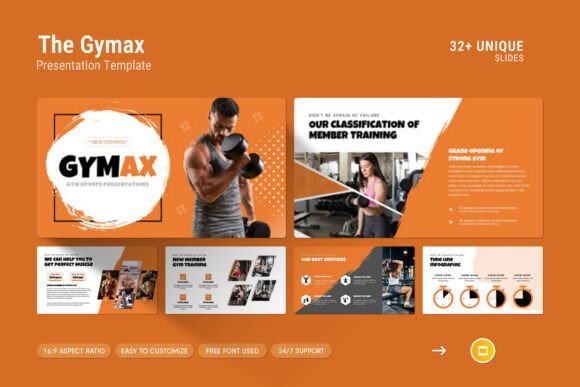
The Gymax Google Slides Template is a versatile and professional design solution that helps you present your work in a clean, modern, and visually striking way. Whether you're showcasing your company profile, pitching a new idea, or sharing project updates, this template offers a range of features to elevate your presentation game.
With its contemporary design, the Gymax template combines creativity with functionality. It includes photo layouts, infographics, tables, vector icons, and diagrams that make it easy to communicate complex information clearly and engagingly. The overall aesthetic is sleek and professional, making it ideal for both personal and commercial use.
Key Features of the Gymax Google Slides Template
The Gymax template comes with a variety of features that make it a go-to choice for designers, marketers, and entrepreneurs. Here are some of the key highlights:
- 33 Slides in Total: A comprehensive set of slides that cover all aspects of a presentation, from introduction to conclusion.
- Master Slides Layout: Ensures consistency across your entire presentation with a single, editable layout.
- Drag and Drop to Change Picture: Easily swap out images without needing advanced design skills.
- Easy Color Change: Customize the color scheme to match your brand or personal style.
- 16:9 Full HD Ratio: Optimized for high-definition displays, ensuring your content looks sharp on any screen.
- Free Font Used: No need to worry about licensing—everything you need is included.
Whether you're using Apple or Windows, the Gymax template is fully compatible, making it a great choice for users across different platforms.
Where the Gymax Template Shines
The Gymax Google Slides Template is suitable for a wide range of creative and professional projects. Its clean and modern look makes it ideal for branding, marketing, publishing, and digital presentations. The design elements are flexible enough to fit into editorial design, packaging design, web design, and social media graphics.
For designers, the template provides a solid foundation to build upon, allowing for easy customization while maintaining a polished appearance. Entrepreneurs and small business owners can use it to create compelling pitches, product launches, or client proposals. Marketers will appreciate the ability to convey data and insights through clear visual storytelling.
The template's use of modern typography and balanced layouts ensures that your message is communicated effectively. It’s not just about looking good—it’s about creating a strong visual hierarchy that guides your audience through your content with ease.
How the Gymax Template Enhances Branding and Communication
When it comes to brand identity, consistency is key. The Gymax template supports this by offering a cohesive design language that can be adapted to match your brand’s voice and personality. The use of premium fonts and well-structured layouts contributes to a sense of professionalism and reliability.
Readability is another important factor in effective communication. The template’s clean lines and thoughtful spacing ensure that your text is easy to read, even on large screens. This is especially important when presenting data, statistics, or detailed information.
For businesses, the Gymax template can help reinforce brand recognition. By using consistent visual elements across presentations, you create a stronger connection with your audience. This can lead to increased trust and engagement, which are essential for long-term success.
Practical Tips for Using the Gymax Template
If you're considering using the Gymax template for your next project, here are a few practical tips to get the most out of it:
- Choose the Right Font Pairing: While the template uses a free font, you can enhance the design by pairing it with complementary typefaces that align with your brand’s identity.
- Test Readability: Make sure your chosen fonts and layouts are legible at different sizes and distances. This is especially important if your presentation will be shown on a large screen.
- Review Included Styles: Take time to explore the various slide designs and layout options available. This will help you find the best fit for your specific needs.
- Consider Commercial Licensing: If you plan to use the template for commercial purposes, double-check the licensing terms to ensure compliance.
The Gymax template is also a great resource for those new to design. Its intuitive structure and easy-to-edit features make it accessible for users of all skill levels. With a little creativity, you can transform a basic presentation into a powerful visual statement.
Support and Resources for Gymax Users
One of the standout features of the Gymax template is the support provided by the developers. If you have questions or need assistance, you can reach out to their team for real-time help. This level of support ensures that you can focus on your content rather than getting stuck on technical details.
In addition to the template itself, you’ll find a help file and a PDF guide that provide further insights into how to use and customize the slides. These resources are invaluable for anyone looking to maximize the potential of the Gymax template.
Overall, the Gymax Google Slides Template is a valuable tool for anyone looking to create professional, visually appealing presentations. Its combination of style, functionality, and flexibility makes it a top choice for designers, marketers, and business professionals alike.